

What's new in Rumble 2.3? #
As usual, our point release is a roll-up of previous 2.2.x releases, and includes additional updates and features. This release primarily focuses on helping you quickly find all internal subnets with minimal network traffic.
Here are the key highlights for this release:
- New RFC1918 coverage report that keeps track of which internal IPv4 subnets have been discovered, which are unscanned but are hinted at by discovered assets, and which are still uncharted territory. This report includes links to run new scans of the unmapped networks using Rumble's lightning-fast subnet sampling feature.
- Enhancements to the SNMP scanner to include additional protocol and cipher support, along with improved capabilities for Dell Force-10 and Cisco Catalyst switches.
- A ton of fingerprint updates and a handful of UX changes, all driven by your feedback, thanks again!
Read on for more details or check out the detailed release notes at Rumble 2.3 changelog.
Identify network blind spots #
Ever wonder how much of your network you have (or haven't) actually scanned with Rumble? Rumble's new coverage report provides graphical maps of the entire RFC1918 address space (10.0.0.0/8, 172.16.0.0/12, 192.168.0.0/16), noting which subnets have been scanned, which likely contain assets, and which are still unknowns. Using this information, you can find missing subnets, rogue devices, and misconfigurations. As a result, you'll have confidence that your IT and security processes account for all network segments.
The report highlights a few key things, namely:
- The overall percentage of your RFC1918 network scanned
- The percentage of each RFC1918 IP range scanned (10.0.0.0/8, 172.16.0.0/12, and 192.168.0.0/16)
- The percentage of each address space scanned; each range has its own coverage map
- Access to scan configurations for each RFC1918 range to find missing subnets and view subnet analysis to find unscanned devices
Find subnets to target with the RFC1918 network coverage maps #
The scan coverage maps show all the addresses scanned within the 10.0.0.0/8, 172.16.0.0/12, and 192.168.0.0/16 ranges. Green boxes indicate that Rumble has scanned some portion of addresses within that space. The darker the color, the more Rumble has scanned. Clicking into any of the scanned subnets gives you access to the subnet grid for deeper asset analysis.
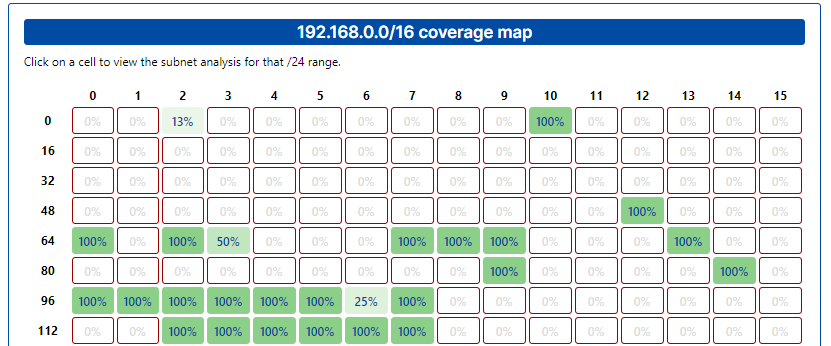
On the flip side, red outlines indicate that there are unscanned addresses Rumble has indirect knowledge of that haven't been scanned directly. For example, this can happen when Rumble finds a secondary IP address on a multi-homed device within a scanned subnet. The red boxes highlight the subnets most likely to be in use, but unscanned.
Scan missing subnets #
From the coverage report, you can launch a scan for any missing subnets in a given RFC1918 block – look for the binocular icon.
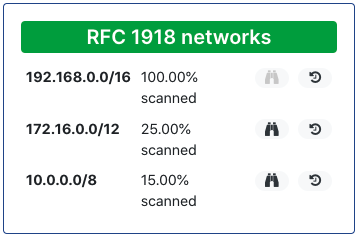
The missing subnets will be shown in the scan scope and the subnet ping will be enabled by default. You can tune the scan configuration as needed for your environment.
How to access the scan coverage report #
To access the new scan coverage report, choose Reports from the left navigation and click on the Coverage tab.
Improvements to the SNMP scanner #
The SNMP probe now supports a wider range of authentication (sha224, sha256, sha384, and sha512) and encryption (aes192, aes256, aes192c, and aes256c) modes. The aes128 mode is now an alias for the standard aes setting. These settings are required for some high-security environments where only strong authentication and encryption is permitted.
Rumble now supports extracting layer-2 topology information from Dell Force-10 switches and supports full per-vlan port enumeration on Cisco Catalyst switches when SNMP v3 is in use, through automatic vlan context configuration.
Easier explorer management #
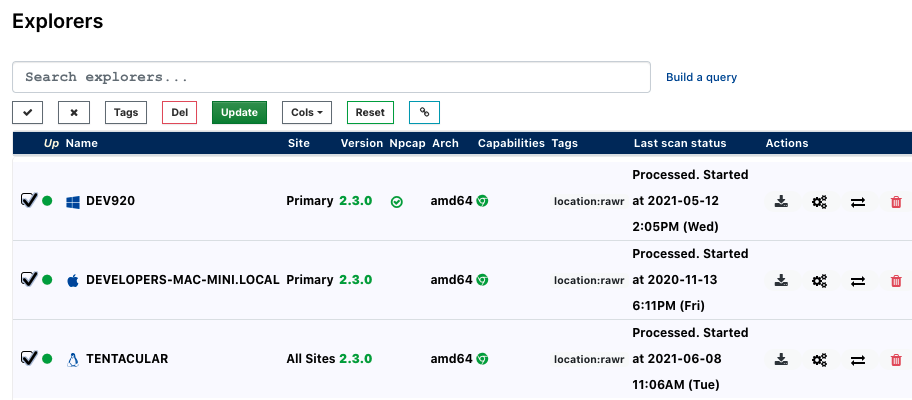
Explorer management is now a lot more efficient and faster with bulk actions. With the new interface, you can quickly search, sort, update, tag, and remove multiple explorers at the same time.
Release notes #
Read the Rumble 2.3 changelog to see all the improvements and updates in this release.
Try Rumble #
Don't have access to Rumble yet? Sign up for a free trial to try out these capabilities for 21 days.